
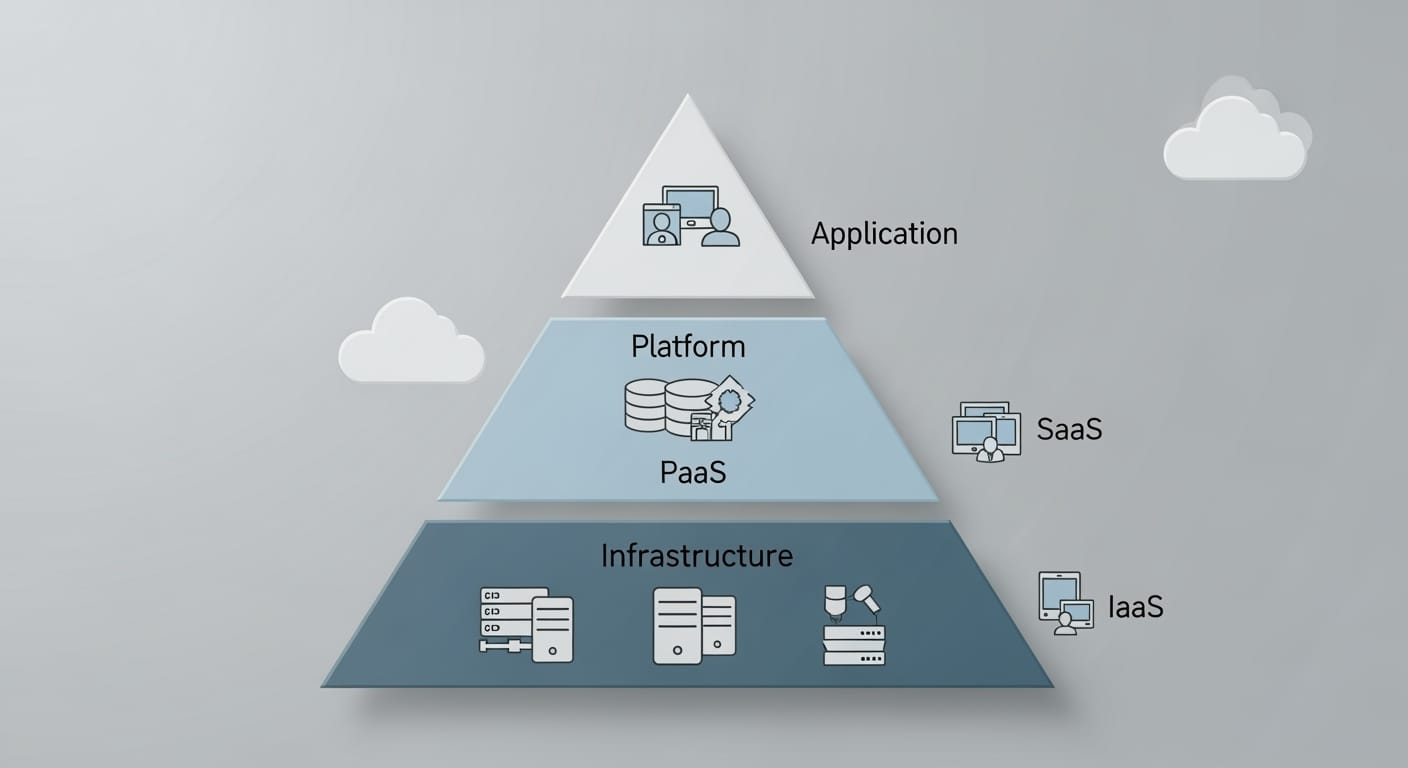
Cloud computing has transformed how we build, deploy, and manage IT infrastructure. Organizations increasingly rely on cloud services. Knowing the differences between Software as a Service (SaaS), Platform as a Service (PaaS), and Infrastructure as a Service (IaaS) is vital. These three models form layers in the cloud stack. Each offers different levels of control, flexibility, and management (Mell & Grance, 2011).
SaaS delivers ready-to-use applications online. PaaS provides a platform for developers to create and run applications without managing hardware. IaaS offers basic resources like virtual machines, storage, and networking on demand. These models vary in service scope, user control, and operational complexity.
Importance of Understanding SaaS, PaaS, and IaaS
Choosing the right cloud model affects costs, scalability, and agility. Organizations must align technology with business goals. This requires assessing development needs, customization, and integration.
Each model shapes how resources and workloads are managed. SaaS reduces the load on IT teams. PaaS and IaaS offer more flexibility but add management tasks. Making informed choices optimizes operations and keeps businesses competitive.
Overview of Key Differences
The main differences involve abstraction and control:
- SaaS delivers complete applications to users.
- PaaS provides a managed platform for app development.
- IaaS offers virtualized hardware resources to configure and control.
| Service Model | User Responsibility | Typical Use Case |
|---|---|---|
| SaaS | Application use | Email, CRM, Collaboration tools |
| PaaS | App development & deployment | Web app development, APIs |
| IaaS | Infrastructure management | Hosting VMs, Storage, Networks |
This table highlights how each model supports different business and technical needs.
Understanding SaaS (Software as a Service)
Definition and Core Concepts
SaaS means software is hosted by a provider and accessed via the internet. Users do not install or maintain software locally. SaaS is scalable and flexible, with subscription billing common.
Its key advantage is simplicity. Providers handle hardware, security, and updates. This reduces the strain on internal IT teams and lowers operational costs.
Architecture and Delivery Methods
SaaS uses multi-tenant architecture. One application instance serves multiple customers securely. Providers can update software centrally, rolling out new features rapidly.
Users access SaaS apps through web browsers, making them device-independent. Mobile apps or desktop clients may also be available. This ensures high availability and remote access.
Common Use Cases and Examples
SaaS powers many business functions:
- Customer Relationship Management (CRM)
- Email and communication
- Project and resource management
- Enterprise Resource Planning (ERP)
Popular SaaS products include Salesforce, Google Workspace, and Microsoft 365. These tools improve collaboration and productivity without heavy IT investments.
Understanding PaaS (Platform as a Service)
Defining PaaS and Its Core Features
PaaS offers a cloud environment to develop, test, and deploy applications. It sits between IaaS and SaaS by providing tools without managing hardware or operating systems (Rittinghouse & Ransome, 2017).
Key features include:
- Integrated development environments (IDEs)
- Middleware and database management
- Built-in scalability and automated updates
- Security protocols managed by providers
PaaS boosts developer productivity by reducing operational tasks.
How PaaS Works and Its Key Use Cases
PaaS services are accessed via web interfaces. They support multiple programming languages, libraries, and frameworks. Many platforms enable continuous integration and deployment (CI/CD), fostering agile development (Buyya et al., 2013).
Use cases include:
- Web and mobile app development
- Hosting APIs and microservices
- Building analytics and business intelligence tools
PaaS accelerates development and allows safe experimentation with new technologies.
Advantages and Challenges of Adopting PaaS
Advantages:
- Dynamic resource scaling with pay-as-you-go pricing
- Seamless integration with other cloud services
- Speedier time-to-market
- Provider-managed security, including encryption and access control (Hashem et al., 2015)
Challenges:
- Potential vendor lock-in complicates migration
- Limited infrastructure customization versus IaaS
- Compliance issues in multi-tenant setups
Understanding these trade-offs helps determine when PaaS fits project needs.
Understanding IaaS (Infrastructure as a Service)
What Is IaaS?
IaaS delivers fundamental computing resources—servers, storage, networking—via the internet. Providers manage hardware, while users control operating systems, applications, and data. It offers fast, flexible provisioning and pay-as-you-go billing.
Key Features and Benefits of IaaS
Features include:
- On-demand virtualized resources
- No upfront investment in physical infrastructure
- Custom configurations to meet specific needs
- Security controls, with user responsibility for apps and data
- Disaster recovery and backup options
Benefits:
- Rapid scalability to match workload demands
- Cost savings by avoiding hardware purchases
- Full control over software environment
- Improved resilience through data protection
Leading providers include Amazon Web Services EC2 and Microsoft Azure Virtual Machines.
Use Cases and Management in IaaS
IaaS fits scenarios such as:
- Website hosting
- Development and testing environments
- High-performance computing tasks
- Storage, backup, and recovery solutions
Startups avoid capital expenses, while enterprises use IaaS for global deployments. Providers manage hardware; users handle software and data security. Effective use demands technical skills for configuration and protection.
Comparative Analysis of SaaS, PaaS, and IaaS
Definition and Core Features
| Model | Description | User Focus |
|---|---|---|
| SaaS | Ready-to-use software accessed via browsers | End-users seeking simplicity |
| PaaS | Platform for building and running applications | Developers needing flexibility |
| IaaS | Virtualized hardware resources on demand | IT teams requiring full control |
User control increases from SaaS (least) to IaaS (most).
Use Cases and Deployment Models
| Model | Use Cases | Examples | Deployment Model |
|---|---|---|---|
| SaaS | Email, CRM, collaboration | Gmail, Salesforce, Microsoft 365 | Multi-tenant |
| PaaS | Web/mobile app development, APIs | Google App Engine, Heroku | Shared or dedicated |
| IaaS | Hosting VMs, storage, backups | Amazon EC2, Azure VMs | Customizable, dedicated |
Deployment affects scalability, security, and integration options.
Cost, Security, and Management Considerations
| Aspect | SaaS | PaaS | IaaS |
|---|---|---|---|
| Pricing | Subscription, per user/license | Resource consumption-based | Usage-based, pay-as-you-go |
| Security | Provider-managed | User secures apps/data | User responsible for all above infrastructure |
| Management | Low complexity, easy onboarding | Moderate, focuses on apps | High complexity, requires IT expertise |
Understanding these factors guides the right model selection.
Future Trends in Cloud Service Models
Expansion of Hybrid and Multi-Cloud Solutions
Hybrid and multi-cloud adoption grows as organizations seek flexibility. Combining public and private clouds balances security and scalability. Providers develop tools for managing workloads across platforms (Gartner, 2023). This reduces vendor lock-in and enhances agility.
APIs and orchestration tools enable resource coordination among SaaS, PaaS, and IaaS. We see advances in unified management dashboards and cross-cloud security controls.
Integration of Advanced Technologies
Cloud models now embed AI, machine learning, and edge computing. SaaS includes AI for automating tasks and insights. PaaS lets developers build AI apps without deep ML expertise. IaaS offers hardware optimized for AI workloads, like GPUs and TPUs (IDC, 2023).
Edge computing brings data processing closer to its source, cutting latency. Cloud platforms add edge nodes in their offerings, blending centralized and distributed resources.
Enhanced Security and Compliance Features
Cloud providers upgrade security with encryption, identity management, and compliance frameworks (CSA, 2024). Customizable modules address industry regulations.
Real-time monitoring and automated threat detection improve defenses. Zero trust architectures and continuous auditing become standard. Clients demand granular controls and transparency, driving provider innovation in security.
References
Armbrust, M., Fox, A., Griffith, R., Joseph, A. D., Katz, R., Konwinski, A., … & Zaharia, M. (2010). A view of cloud computing. Communications of the ACM, 53(4), 50-58.
Amazon Web Services. (n.d.). What is IaaS? https://aws.amazon.com/what-is-iaas/
Buyya, R., Vecchiola, C., & Selvi, S. T. (2013). Mastering Cloud Computing: Foundations and Applications Programming. Morgan Kaufmann.
CSA. (2024). State of Cloud Security. Cloud Security Alliance.
Gartner. (2023). Magic Quadrant for Cloud Infrastructure and Platform Services.
Hashem, I. A. T., Yaqoob, I., Anuar, N. B., Mokhtar, S., Gani, A., & Khan, S. U. (2015). The rise of “big data” on cloud computing: Review and open research issues. Information Systems, 47, 98-115.
IDC. (2023). Worldwide Public Cloud Services Spending Guide.
Marston, S., Li, Z., Bandyopadhyay, S., Zhang, J., & Ghalsasi, A. (2011). Cloud computing—The business perspective. Decision Support Systems, 51(1), 176-189.
Mell, P., & Grance, T. (2011). The NIST definition of cloud computing. National Institute of Standards and Technology.
Microsoft Azure. (n.d.). Infrastructure as a service (IaaS). https://azure.microsoft.com/en-us/resources/cloud-computing-dictionary/what-is-iaas/
Rittinghouse, J. W., & Ransome, J. F. (2017). Cloud computing: Implementation, management, and security. CRC Press.
FAQ
What is cloud computing and why are SaaS, PaaS, and IaaS important?
Cloud computing transforms how IT infrastructure is built, deployed, and managed. SaaS, PaaS, and IaaS are three essential service models offering different levels of control, flexibility, and management. Understanding these models helps organizations choose the right cloud solutions to align technology investments with business goals.
What is Software as a Service (SaaS)?
SaaS delivers ready-to-use applications over the internet, accessed via web browsers without installation. Providers manage infrastructure, security, and updates, allowing users to focus on application use with minimal technical overhead.
How does SaaS architecture work?
SaaS uses a multi-tenant architecture where a single application instance serves multiple customers securely. This allows centralized updates, rapid deployment, and scalable access from any device with internet connectivity.
What are common use cases and examples of SaaS?
SaaS is widely used for email, CRM, project management, and ERP solutions. Popular examples include Salesforce, Google Workspace, and Microsoft 365, offering collaboration and productivity tools.
What is Platform as a Service (PaaS)?
PaaS provides a cloud-based environment for developing, testing, and deploying applications. It offers development tools and services without requiring management of underlying hardware or operating systems.
What are the core features of PaaS?
Key features include integrated development environments, middleware, database management, scalability, automated updates, and security protocols that simplify the software development lifecycle.
How do developers use PaaS and what are its typical use cases?
Developers access programming languages, libraries, and frameworks via web interfaces to build web/mobile apps, host APIs, microservices, and develop analytics tools. PaaS supports agile development with continuous integration and deployment.
What are the advantages and challenges of PaaS?
Advantages include dynamic scaling, seamless integration, faster time-to-market, and managed security. Challenges involve potential vendor lock-in, limited infrastructure customization, and compliance complexities in multi-tenant environments.
What is Infrastructure as a Service (IaaS)?
IaaS provides fundamental computing resources like virtual machines, storage, and networking on demand. Users control operating systems and applications, while providers manage physical hardware.
What are the main features and benefits of IaaS?
IaaS offers virtualized resources, cost savings by avoiding physical infrastructure investments, customizable configurations, disaster recovery, and scalability. It grants greater control but requires technical skills for management.
What are typical use cases for IaaS?
IaaS is used for hosting websites, development/testing environments, high-performance computing, storage, backup, and global deployment. It fits businesses needing flexible, scalable infrastructure with control over software.
How do SaaS, PaaS, and IaaS differ in user responsibility and control?
SaaS users primarily use applications with minimal management. PaaS users develop and deploy applications but do not manage hardware. IaaS users manage infrastructure configurations, operating systems, and applications, requiring more technical expertise.
What are the cost models associated with SaaS, PaaS, and IaaS?
SaaS generally uses subscription-based pricing. PaaS costs depend on resources consumed like compute and storage. IaaS typically employs usage-based billing, requiring careful cost monitoring.
How do security responsibilities vary among SaaS, PaaS, and IaaS?
In SaaS, providers handle most security tasks. PaaS users secure their applications and data. IaaS users are responsible for securing everything above the physical infrastructure layer, increasing management complexity from SaaS to IaaS.
What are hybrid and multi-cloud solutions in relation to cloud service models?
Hybrid and multi-cloud solutions combine public and private clouds for security and scalability. Cloud providers improve interoperability and management tools across SaaS, PaaS, and IaaS to reduce vendor lock-in and increase operational agility.
How are advanced technologies integrated into cloud service models?
Cloud models increasingly incorporate AI, machine learning, and edge computing. SaaS offers AI business tools, PaaS supports AI application development, and IaaS provides optimized hardware for AI workloads. Edge computing reduces latency by processing data near its source.
What security and compliance enhancements are available in cloud service models?
Modern cloud services include encryption, identity management, compliance frameworks, real-time monitoring, automated threat detection, zero trust architectures, continuous auditing, and granular data governance controls.
What factors should businesses consider when choosing between SaaS, PaaS, and IaaS?
Organizations should evaluate control needs, scalability, maintenance responsibilities, security requirements, cost implications, and specific use cases to select the most appropriate cloud service model.
What are some examples of popular providers for each cloud service model?
SaaS examples include Salesforce, Google Workspace, and Microsoft 365. PaaS platforms include Google App Engine and Heroku. IaaS providers include Amazon EC2 and Microsoft Azure Virtual Machines.



0 Comments